
Your offers
Track price offers, seller counters, proof requests, expirations, accepted-offer cart review, and seller messages from one account view.
Offer lifecycle
From offer to cart review
Saved items and watched auctions stay separate from offers. An item only moves toward checkout review after a seller accepts or the buyer accepts a seller counter.
Sent
$365 offer sent on creator graphics card.
Buyer can revise or cancel.
Countered
Seller countered at $378 with insured shipping.
Buyer response due tonight.
Proof Needed
Serial-area retake requested before acceptance.
Attach proof, then resume.
Revised
Console offer changed to $115 after reviewing the accessory count.
Seller has not responded yet.
Expired
Planter offer expired without changing the live $84 listing.
Buyer can send a new offer.
Accepted
$60 chair offer opens cart review with local-pickup terms.
No payment collected here.

Creator graphics card
$365 offer | seller countered $378 | excellent condition | insured shipping
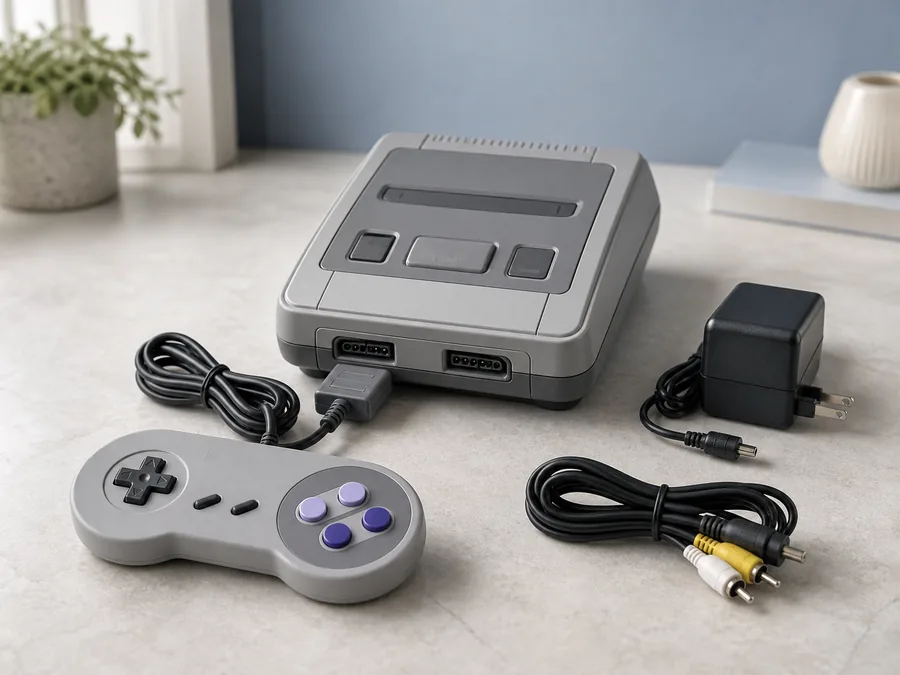
Restored 16-bit console set
$115 offer | excellent condition | accessory count confirmed | awaiting PixelVault

Cordless trimmer kit
$110 offer | safety-guard photo requested | very good condition | local pickup

Accepted chair offer
$60 accepted | very good condition | same-day pickup terms locked for cart review
Sent Offers
- Sent offers should show item snapshot, offer amount, buyer note, quantity, handoff choice, expiration, and current owner.
- Buyers should be able to revise, cancel, message, compare, or wait from the same card.
- Offer history should stay tied to the listing, seller, inbox thread, and any later cart review.
Seller Counters
- Seller counters should show counter amount, included shipping or pickup terms, return setting, deadline, and seller note.
- Buyers should see accept, counter, decline, message, and save actions without losing the item context.
- Counter history should remain visible to support if the accepted offer becomes an order report.
Proof Requests
- Proof requests should specify the missing photo, serial area, accessory count, fit confirmation, certificate, or handoff detail.
- Open proof requests should pause acceptance until the seller or buyer has the missing evidence.
- Proof history should connect to media evidence, item authentication, and support review.
Expiration States
- Active, expiring, expired, declined, withdrawn, accepted, and cart-ready states should each show a clear next step.
- Expired offers should keep history but should not open cart review until a new accepted offer exists.
- Quiet-hour rules and notification preferences should control urgent offer notices.
Accepted-Offer Cart Review
- Accepted offers should open cart review with item price, seller terms, handoff choice, fee visibility, and buyer acknowledgement.
- Cart review should stop before payment details in this demo while still showing what the buyer would confirm.
- Accepted-offer records should flow into purchases, receipts, settlement review, and support context.
Offer Eligibility and Boundaries
- Price offers appear only on buy-now listings whose seller allows them; auctions keep bidding in the bids flow.
- Sold, ended, and unavailable items can be saved or compared, but cannot accept a new offer.
- Accepted amounts, condition evidence, seller terms, and handoff choices stay attached through cart review.
Message Safety
- Seller messages should remain item-linked so price promises, proof requests, and handoff terms do not drift out of context.
- Off-platform pressure, private data requests, suspicious attachments, or abusive counters should remain reportable.
- Support should see the customer-safe offer history without exposing private payment credentials.
Owner Approval
- Owners should approve sent-offer states, seller counters, proof requests, expiration behavior, accepted-offer cart review, item eligibility, and message safety.
- Launch review should confirm that offer events connect to checkout, purchases, notifications, seller dashboard, wallet, support, and settlement records.
- Rollback should pause new offers while keeping existing accepted offers, order records, messages, and support evidence available.
Offer Negotiation
Buyer offers, seller counters, proof requests, expiration states, and cart review.
Seller Thread
Seller questions, counter terms, proof requests, and handoff choices.
Checkout Review
Accepted offers move into cart review with item terms and handoff choices.
Cart Center
Accepted-offer terms, saved-for-later items, credits, and checkout readiness.

Purchases Center
Accepted offers become purchase records, receipts, reviews, returns, and reports.
Saved Items
Keep an item without making an offer, and return when its price or availability changes.

Auctions and Bids
Auction listings use bid controls and lifecycle rules instead of price offers.
Seller Dashboard
Seller-side offer queue, counters, inventory, orders, reports, and analytics.

Message Safety
Conversation boundaries, attachments, reports, blocking, privacy, and owner approval.
Current demo state
Offers are represented with guided account data.
The demo shows price offers, seller counters, proof requests, expiration states, accepted-offer cart review, item eligibility, message safety, and owner approval without asking for payment details.
Future platform state
Launch-ready offers need connected account and commerce services.
Launch needs sign-in, offer storage, expiration jobs, inventory reservation, notification delivery, seller permissions, abuse review, checkout execution, order creation, support ownership, and audit logs.